Ownership Transfer
When an open-source project needs to be moved from a personal account to an organization, or transferred between users, GitHub provides the Transfer ownership feature.
When to Transfer
- Personal project to organization: The project has grown and needs team-based management
- Departure/exit: The original maintainer is no longer involved and needs to hand off to a new maintainer
- Community incubation: A personally initiated project is adopted by a community and moved under a community organization
Preparation Before Transfer
Before transferring, confirm the following:
- Notify all collaborators: Inform the project's collaborators and active contributors in advance
- Back up important data: Although GitHub transfer preserves most data, a local backup is recommended
- Check CI/CD configuration: The repository URL will change after transfer — related configurations need updating
- Confirm target account/organization permissions: You must be an Owner of the target organization
Transfer Steps
- Go to the repository's Settings page
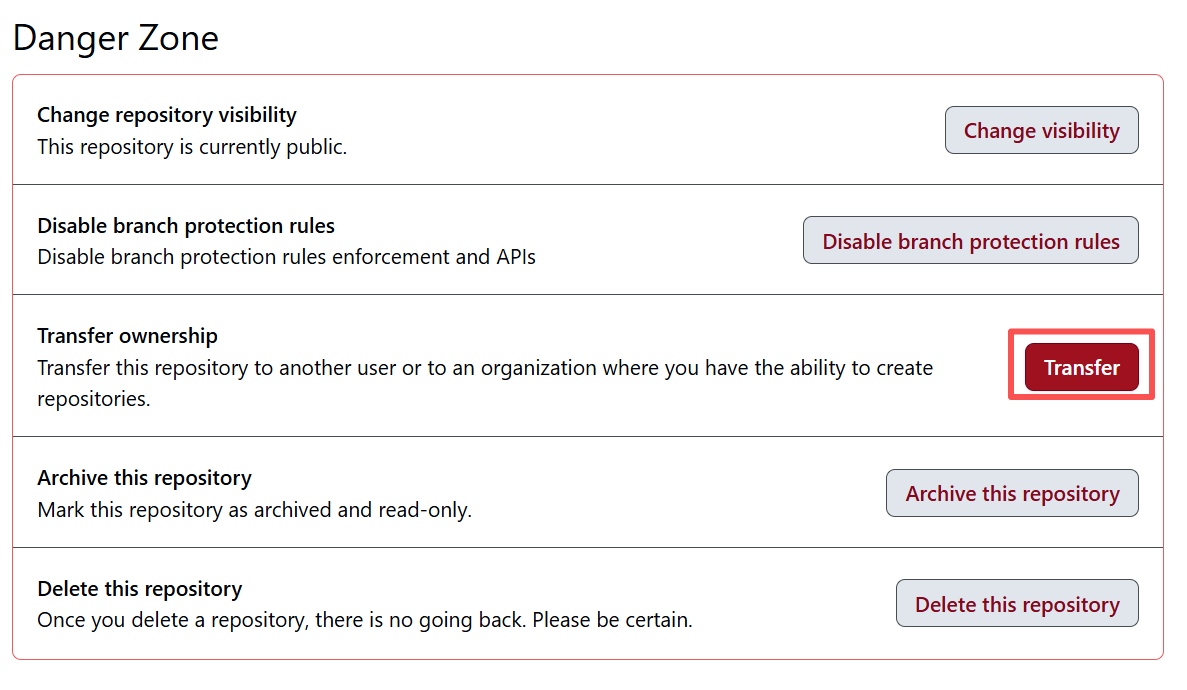
- Scroll to the bottom to the Danger Zone
- Click Transfer ownership
- Enter the target account or organization name
- Type the repository name to confirm
- Click to confirm the transfer
What Happens After Transfer
| Item | Preserved? |
|---|---|
| Code and commit history | Yes |
| Issues and PRs | Yes |
| Stars and Watchers | Yes |
| Fork relationships | Yes |
| GitHub Pages | Needs reconfiguration |
| Webhooks | Preserved but URLs may need updating |
| Old URL redirects | GitHub redirects automatically |
Note
Although GitHub automatically redirects the old URL to the new one, it is recommended to update the following as soon as possible after transfer:
- Repository links in project documentation
- Repository URLs in CI/CD configurations
- Repository information in package managers such as npm / PyPI
Next Step
Now that you understand ownership transfer, learn how to preview your documentation site from a fork — Fork Site Preview.